AWS
Pehra runs on AWS at aws.pehra.dijmo.com, in Mumbai on one Graviton instance, from one CloudFormation template.
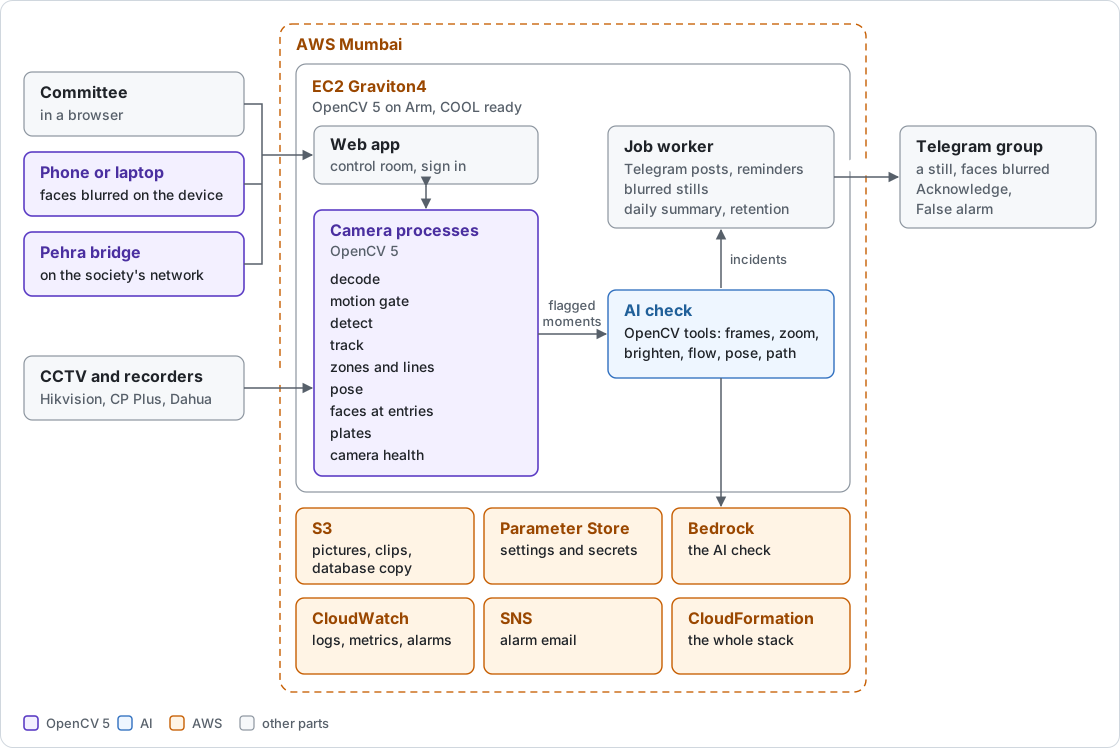
What each service does
- EC2 on Graviton4
- One c8g instance runs everything with OpenCV 5 on Arm. Given the COOL image id, the same template runs COOL's OpenCV instead.
- Amazon S3
- Pictures, clips and a Litestream copy of the database.
- Amazon Bedrock
- One model checks flagged moments, compiles watches and answers questions: Amazon Nova 2 Lite on our deploy, Claude Haiku 5.5 with Marketplace access.
- SSM Parameter Store
- Settings and secrets, loaded when each service starts.
- CloudWatch
- Logs, metrics, a dashboard and alarms.
- SNS
- Alarm emails to the operator.
- CloudFormation and Budgets
- The whole stack from one template, with a monthly budget alarm.
Running the instance is estimated at about $105.00 a month, an estimate from list prices and not a bill, before Bedrock, S3 and data transfer (the estimate).
Deploy it
- An AWS account on the Paid plan, and the AWS command line with a profile named pehra.
- In AWS Marketplace, subscribe to COOL for Graviton4 and copy its image id for Mumbai.
- In the Bedrock console, turn on access to Claude Haiku 5.5.
- Point Google sign in, the Polar webhook and your Telegram bot at your domain.
- Copy the parameters file, keep it private, and fill in the COOL image id, an alert email and your keys.
- Run the deploy as a dry run, read it, then run it.
- Point the domain's A record at the address it prints, and open /healthz.
cp deploy/params.env.example deploy/params.env && chmod 600 deploy/params.env
deploy/deploy.sh --dry-run
deploy/deploy.sh
The deploy refuses to finish unless OpenCV from COOL is the one running and the app fits its memory budget. Details are in the README and the template.